
A VPN can hide your normal IPv4 address while leaving IPv6 outside the tunnel. This is one of the easier VPN failures to miss because a browser may appear to be using the VPN correctly. An ordinary IP check returns the VPN’s IPv4 address. The VPN client says “Connected.” DNS may even look normal.
Then an IPv6-capable connection takes a different route. On a dual-stack host, IPv4 and IPv6 are separate forwarding paths. Securing one does not automatically secure the other. RFC 7359 documents exactly this failure mode: a VPN can install the routes needed to carry IPv4 through the tunnel while IPv6 continues to use the local network.
The useful question is not “did the test find an IPv6 address?” It is: which IPv6 source address was used, and which interface and route carried that traffic to the Internet?
This is cluster #3 in the VPN & Privacy guides, under the What Is a VPN Leak? pillar, alongside the DNS leak and WebRTC leak guides.
01 / Definition
What is an IPv6 leak?
An IPv6 leak occurs when IPv6 traffic that a VPN or another routing policy should protect instead leaves through an unintended network path.
The common case is a full-tunnel VPN that handles IPv4 but does not handle IPv6 correctly:
Expected policy: IPv4 → VPN, IPv6 → VPN.
Actual behavior: IPv4 → VPN, IPv6 → physical interface → ISP.
If the host has globally routable IPv6 connectivity from the ISP, an IPv6-capable website may receive a source address associated with that native connection rather than the VPN. That is a routing leak. It is not caused merely by the machine having IPv6 enabled.
02 / Quick answer
Quick answer
| Result | IPv6 leak? | How to read it |
|---|---|---|
| ISP-side public IPv6 appears while a full-tunnel VPN should protect IPv6 | Likely yes | IPv6 is probably leaving through the physical network. |
| VPN-provided IPv6 appears | Normally no | IPv6 is using the expected VPN egress. |
| No public IPv6 connectivity while connected to a VPN that intentionally blocks IPv6 | Normally no | Blocking IPv6 can be a deliberate protection policy. |
| fe80::… appears | No, by itself | Link-local IPv6 is limited to the local link. |
| fc00::/7 address appears | No, by itself | Unique Local Address; not expected to be globally routed. |
| A temporary IPv6 address appears | Not automatically | Temporary addressing changes the interface identifier, not the routing policy. |
| Public IPv6 works without the VPN but disappears when the VPN connects | Often expected | The VPN may deliberately suppress IPv6. |
| IPv4 uses the VPN, but public IPv6 still maps to the baseline ISP / ASN | Strong evidence | Dual-stack traffic is following different paths. |
| IPv6 appears only during a VPN reconnect | Potential leak | IPv6 may be failing open during a route transition. |
The address type matters. The route matters more.
03 / Model
Why IPv6 leaks happen even when IPv4 is protected
This is easier to understand if you stop thinking of “Internet connectivity” as one route. A dual-stack machine maintains IPv4 and IPv6 forwarding state independently.
The IPv4 default route is 0.0.0.0/0. The IPv6 default route is ::/0. A VPN can change one without correctly changing the other.
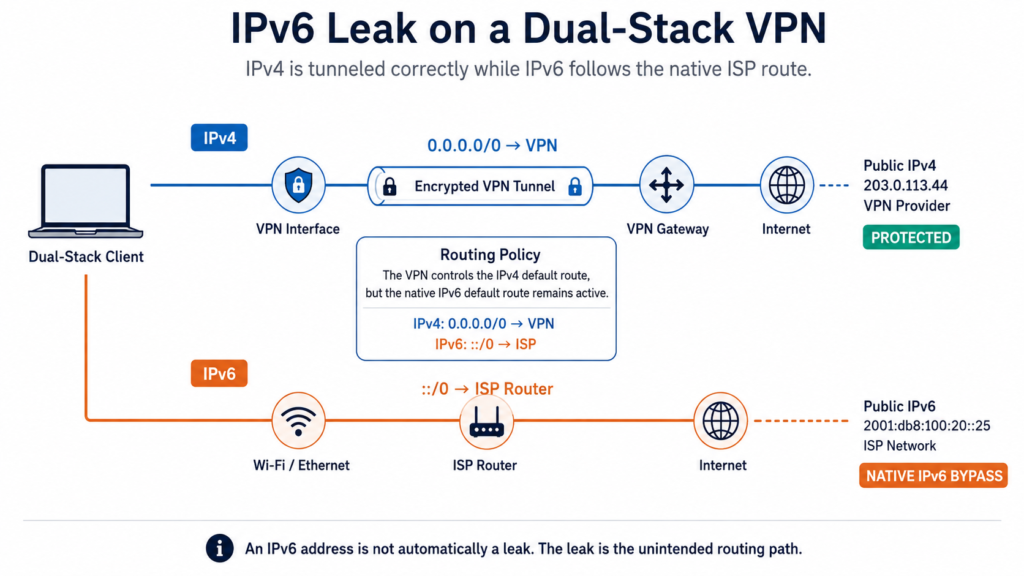
Imagine the host starts with 0.0.0.0/0 → home router and ::/0 → home router. The VPN connects and installs 0.0.0.0/0 → VPN interface, but IPv6 remains ::/0 → ISP router.
There is no contradiction here from the operating system’s perspective. An IPv4 destination uses the IPv4 forwarding table; an IPv6 destination uses the IPv6 forwarding table. The IPv4 tunnel is working. It simply does not protect both protocol families. This dual-stack leakage scenario is specifically described in RFC 7359.
04 / Example
A real IPv6 leak scenario
Consider a laptop connected to a residential dual-stack network. Before the VPN, the Wi-Fi interface has a private IPv4 of 192.168.1.20, a public IPv4 of 198.51.100.25, and an IPv6 address of 2001:db8:100:20::25.
For documentation, RFC 5737 reserves 198.51.100.0/24 for IPv4 examples, and RFC 3849 reserves 2001:db8::/32 for IPv6 examples.
Now the VPN connects. It provides a VPN IPv4 of 203.0.113.44 but no IPv6 tunnel. The routing state effectively becomes 0.0.0.0/0 → VPN and ::/0 → Wi-Fi.
A normal IPv4 checker shows 203.0.113.44 and everything looks fine. An IPv6-capable endpoint sees the native IPv6 path. That is why testing only IPv4 is incomplete on a dual-stack host.
05 / Classification
An IPv6 address is not automatically a leak
One of the easiest ways to produce a bad IPv6 leak detector is to mark every IPv6 address as dangerous. A host can legitimately have several IPv6 addresses. RFC 4291 defines IPv6 addresses as being assigned to interfaces, and a single interface may have multiple addresses and different scopes. Classify the address first, then look at the path.
Globally routable IPv6 address
A globally routable IPv6 address can be used beyond the local link when routing permits. If an IPv6 test shows a globally routable source address associated with your native ISP while the VPN is supposed to carry IPv6, investigate the route. Even here, do not diagnose the leak from the text representation alone — compare the baseline IPv6, network prefix, ASN / provider, outgoing interface, routing table and VPN policy. The question is whether the address represents an unprotected Internet path.
Link-local IPv6: fe80::/10
A link-local IPv6 address, for example fe80::a12b:34ff:fe56:7890, is a completely different case. Link-local addresses are designed for communication on a single link, and routers must not forward packets with link-local source or destination addresses to another link. They are used by mechanisms such as Neighbor Discovery and local IPv6 communication.
So fe80::… appearing in some browser or interface output is not evidence that your public IPv6 has bypassed the VPN. It tells you that the interface has IPv6 link-local state. That is normal.
Unique Local IPv6: fc00::/7
Unique Local Addresses (ULAs) use fc00::/7; in practice, locally assigned ULAs use fd00::/8. RFC 4193 defines ULAs for local communication and states that they are not expected to be routed on the global Internet.
An address such as fd31:8c20:45a2::10 is therefore not equivalent to a globally routable IPv6 address from the ISP. It may reveal information about internal network addressing and may matter for fingerprinting or topology disclosure. But ULA exposure is not the same finding as a public IPv6 VPN leak.
06 / Distinction
Globally routable IPv6 vs. inbound reachability
There is another distinction worth keeping. A globally routable IPv6 source address does not automatically mean that arbitrary hosts on the Internet can initiate connections to your machine. The host or router may have stateful firewall rules blocking unsolicited inbound traffic.
So these statements are different: the host has a globally routable IPv6 address, and the host accepts arbitrary inbound connections from the Internet. A VPN leak test is primarily interested in the first question — which source address and path does outbound traffic use? It is not a remote firewall audit.
07 / Addressing
NAT, temporary addresses and SLAAC
IPv6 does not need NAT to work
IPv4 users are accustomed to seeing a private laptop address such as 192.168.1.20 behind a router / NAT address such as 198.51.100.25. IPv6 was not designed around requiring address translation in the same way. A client can have an IPv6 address from a globally routable prefix and use it as an Internet source address.
That makes an IPv6 routing leak particularly visible. A leaked IPv6 address may carry a prefix associated with the ISP connection rather than the VPN network. That does not mean the complete address is a permanent personal identifier — modern systems may use temporary IPv6 addresses — but the route can still identify the native network.
Temporary IPv6 addresses do not fix a VPN leak
IPv6 privacy addressing is often misunderstood. Modern hosts can generate temporary SLAAC addresses with randomized interface identifiers that change over time, reducing address-based correlation. RFC 8981 defines this behavior.
Suppose the ISP gives the network a prefix conceptually like 2001:db8:1234:5600::/64. A temporary source address might change from 2001:db8:1234:5600:4b21:8e23:21e7:91d2 to another interface identifier later. The host portion changed. The route was not suddenly turned into a VPN route. The ISP-side prefix can still identify the native network. So a temporary IPv6 address is not the same thing as VPN protection — privacy addressing and VPN routing solve different problems.
SLAAC is not an IPv6 leak
IPv6 hosts can configure addresses through Stateless Address Autoconfiguration (SLAAC). RFC 4862 describes how hosts can generate link-local and global addresses using information advertised on the local link.
If Wi-Fi provides the host with native IPv6 via SLAAC, that is normal network operation. The leak occurs later if the VPN policy says all Internet traffic must use the tunnel but the native IPv6 address and route remain usable outside that tunnel. Do not confuse address configuration with route-policy failure.
08 / Native route
Router Advertisements and the native IPv6 default route
On a normal IPv6 network, Router Advertisements are part of Neighbor Discovery. They identify default routers and can carry prefix information used by hosts on the link. RFC 4861 defines the Neighbor Discovery mechanisms used for router, neighbor and reachability discovery.
This matters during VPN troubleshooting because the physical interface may still retain a valid IPv6 default route learned from the local network — conceptually ::/0 via ISP router dev Wi-Fi. If the VPN does not supersede, block or otherwise account for that route, native IPv6 can remain available. The tunnel does not need to be “broken.” Its IPv6 policy may be incomplete.
09 / Forwarding
The routing table matters more than the VPN badge
When investigating this problem, the word “Connected” matters much less than the forwarding decision.
Suppose the machine has ::/0 → VPN. That looks good. But now suppose there is also 2001:db8:abcd::/48 → physical interface. For a destination inside that /48, the more-specific route wins over the default route. This is ordinary longest-prefix-match behavior. So even a VPN-installed ::/0 is not proof that every IPv6 destination uses the tunnel. Look at the full route table, not just the default route.
Routing determines the outgoing path, but IPv6 also includes source address selection logic. A host may have several candidate IPv6 addresses across several interfaces. RFC 6724 defines default source and destination address selection and allows administrative policy to influence those decisions.
An engineer investigating an IPv6 leak asks both: which interface will carry this packet, and which IPv6 source address will the host select? The two decisions are closely related.
10 / Connection logic
Why a website may use IPv6 even when IPv4 works
A hostname can have both A and AAAA records, so an application may have both IPv4 and IPv6 destinations to choose from. Modern connection logic can race IPv6 and IPv4 instead of waiting for one address family to fail. RFC 8305, Happy Eyeballs Version 2, describes this approach to reduce connection delay.
That has an important consequence for VPN testing. You cannot assume “IPv4 works through the VPN, so the browser will use IPv4.” If native IPv6 remains usable, an application may establish an IPv6 connection instead. The forwarding table then decides where those packets go.
11 / Layers
AAAA records do not cause IPv6 leaks
A DNS server returning an AAAA record is not itself an IPv6 leak. For example, example.com might return A → 192.0.2.10 and AAAA → 2001:db8::10. DNS has told the application that the service has an IPv6 destination. The leak occurs if the subsequent IPv6 connection follows a route that violates VPN policy.
Keep these layers separate:
- DNS — which destination addresses are available?
- Address selection — which destination does the application try?
- Routing — which interface carries the packet?
- VPN policy — was that path allowed?
This separation prevents many bad diagnoses.
12 / Comparison
IPv6 leak vs. DNS, WebRTC and IP leaks
IPv6 leak vs. DNS leak
They are not the same failure. A DNS leak might send DNS through the physical interface to an ISP resolver while application IPv6 traffic is properly tunneled. An IPv6 leak might have DNS and IPv4 through the VPN while IPv6 goes to the ISP. You can have one without the other. That is why a DNS leak test and an IPv6 connectivity test answer different questions.
IPv6 leak vs. WebRTC leak
A normal browser connection can leak native IPv6 because the operating system routes IPv6 outside the VPN. WebRTC can also expose or use a native IPv6 candidate through ICE. Those observations may share the same underlying routing problem, but they are not the same test. HTTPS over IPv6 → native ISP is already an IPv6 routing leak; you do not need WebRTC for that failure to exist. Conversely, WebRTC candidate exposure needs its own interpretation based on ICE candidate type and route.
IPv6 leak vs. IP leak
An IPv6 leak is an IP-routing privacy failure, but separating IPv4 and IPv6 makes diagnosis clearer. You could see a public IPv4 that belongs to the VPN provider and a public IPv6 that belongs to the ISP. That result immediately tells you more than a generic “IP leak” badge: the two protocol families are not following the same security policy.
Related tool: IP Lookup — check the network, ASN and registration behind any IPv4 or IPv6 address you observe.
13 / Policy
Full tunnel vs. split tunnel: identify the policy
Before calling anything a leak, identify the intended policy. A full-tunnel VPN generally routes Internet-bound traffic through the VPN. A split-tunnel VPN deliberately allows some traffic to leave outside it. Microsoft’s Windows VPN documentation explicitly makes this distinction: force-tunnel and split-tunnel configurations apply different routing policies.
If IPv6 is deliberately routed outside the VPN because that is how the profile is designed, the observed native path is to be expected. Whether that is acceptable for your privacy requirements is another question. A leak diagnosis should compare the intended routing policy against the actual forwarding behavior, not against a generic expectation that every VPN behaves identically.
14 / Designs
Three valid ways a VPN can handle IPv6
A VPN does not necessarily have to provide a VPN-side IPv6 address to avoid leakage. There are several defensible designs.
1. Tunnel IPv4 and IPv6
IPv4 → VPN, IPv6 → VPN. This is the cleanest dual-stack model. The user can retain IPv6 connectivity while both address families use the protected path.
2. Tunnel IPv4 and block native IPv6
IPv4 → VPN, IPv6 → blocked. This removes IPv6 connectivity while the VPN is active. It is less complete from a networking perspective, but it can prevent native IPv6 from bypassing an IPv4-only tunnel.
3. Explicit split policy
Selected IPv4 / IPv6 prefixes go through the VPN; other traffic uses the physical network. This may be legitimate in corporate or application-specific environments. The important part is that the behavior is deliberate and documented.
The failure case
When full-tunnel protection is expected, the accidental fourth case is the problem: IPv4 → VPN, IPv6 → native path left active. That is the classic dual-stack VPN leakage described by RFC 7359.
15 / Method
How to test for an IPv6 leak properly
Do not start with the VPN connected. You need a baseline.
Step 1: Test without the VPN
Record public IPv4; public IPv6, if available; ISP / ASN; physical interfaces; the IPv4 route; the IPv6 route.
If no IPv6 connectivity exists before the VPN, you cannot reproduce the classic native-IPv6 leak on that network at that moment. That does not prove the VPN supports IPv6 correctly — it means there is currently no native IPv6 path available to leak through.
Check your VPN leak paths
Run the VPN Leak Test to record your baseline IPv4 and IPv6 behavior, then repeat it after connecting the VPN and compare the public IPv4 and IPv6 results.
Run VPN Leak TestStep 2: Connect the VPN
Confirm what the VPN claims to do. Does it support IPv6, assign a VPN-side IPv6 address, block IPv6, use split tunneling, or exclude selected applications? Without this information, interpretation becomes guesswork.
Step 3: Repeat IPv4 and IPv6 tests separately
A healthy dual-stack full-tunnel result might be IPv4 → VPN ASN and IPv6 → VPN ASN. An IPv4-only VPN that safely suppresses IPv6 might show IPv4 → VPN ASN and IPv6 → unavailable. A suspicious result is IPv4 → VPN ASN and IPv6 → baseline ISP ASN. That deserves investigation.
Step 4: Verify the route
If the IPv6 result looks suspicious, inspect the host. Find ::/0, but do not stop there — look for more-specific IPv6 routes too. Then ask the operating system which path it would use toward a known IPv6 destination. That is more useful than guessing from a city label.
Step 5: Test reconnect behavior
Disconnect and reconnect safely. Test the initial VPN connection, tunnel interruption, server change, Wi-Fi change and sleep/wake. A VPN can have perfect steady-state IPv6 routing and still fail open during transitions.
16 / Interpretation
How to read an IPv6 leak test
Public IPv6 maps to the VPN egress / provider
Normally expected. Confirm that it is actually associated with the VPN network rather than relying only on location.
Public IPv6 matches the baseline ISP connection
For a full-tunnel VPN that claims to protect IPv6, this is strong evidence of leakage. Then verify the route.
No IPv6 is detected
That result needs context. If IPv6 worked before the VPN connection and disappears after the VPN connects, the VPN may intentionally be blocking IPv6 — a valid anti-leak strategy. If your VPN claims to provide IPv6 tunneling, however, the same result may indicate incomplete IPv6 support rather than a leak.
fe80:: appears
Do not classify it as a public IPv6 leak. It is link-local.
fd… or another ULA appears
Again, not the ISP-facing public IPv6 address. Treat it as local network information.
A different public IPv6 appears every few hours
That can happen with temporary / privacy addresses. Compare the prefix and network ownership, not only the full 128-bit value.
Geolocation is weak evidence
If the VPN says France and the IPv6 test says Belgium, that does not by itself prove a leak. IP geolocation databases can be wrong, providers can route prefixes through distributed infrastructure, and registration data and actual packet egress are not always the same thing. Use stronger signals: baseline prefix, ASN, provider, route and interface. Location is useful context; it is not routing proof.
17 / Interpretation
When the address changes but the leak does not
Suppose your baseline gives 2001:db8:8a20:1000:7c21:… and later you see 2001:db8:8a20:1000:a934:…. The interface identifier changed. The routing prefix remains linked to the same network.
Temporary addressing can reduce address-based correlation, but it does not transform an ISP route into a VPN route. RFC 8981 changes interface identifiers over time; it does not change the network prefix or the VPN routing policy. When troubleshooting, compare the prefix, ASN / provider and selected route rather than relying on exact 128-bit address equality.
18 / Interpretation
Does IPv6 expose more than IPv4?
Not automatically. On many native IPv6 networks, hosts use globally routable source addresses rather than the private-address-plus-NAT pattern typical of residential IPv4. That can make the native source prefix more directly visible to the destination. However, modern IPv6 hosts are capable of using temporary addresses, and firewalls can block unsolicited inbound connections.
The useful security statement is narrower: if public IPv6 bypasses your VPN, the destination can observe an address associated with that native IPv6 path. That does not make IPv6 itself unsafe. The problem is the routing or filtering policy, not IPv6 itself.
19 / Failure modes
IPv6 leaks during VPN reconnects
This deserves testing separately. A stable tunnel might have ::/0 → VPN. Then the VPN drops, the tunnel route disappears, and the physical interface still has ::/0 → ISP router.
An application creates a connection before the tunnel is restored, so the resulting path is application → native IPv6 → ISP → Internet. A second later, the VPN reconnects. A test run only after reconnection will miss the event. This is a fail-open problem.
20 / Interpretation
Does a kill switch prevent IPv6 leaks?
A correctly implemented kill switch can help. During tunnel failure, it should prevent protected traffic from silently switching to an unprotected interface. But a checkbox labeled “Kill Switch” does not prove that the policy covers IPv6. Test it. A product could block IPv4 fallback while leaving IPv6 usable. IPv4 policy and IPv6 policy need separate verification.
21 / Causes
Common causes of IPv6 leaks
A few patterns account for most cases worth troubleshooting:
- an IPv4-only VPN client on a dual-stack access network;
- missing IPv6 tunnel routes;
- native
::/0remaining preferred; - a more-specific native IPv6 route;
- split-tunnel policy;
- application exclusions;
- multiple active interfaces;
- competing VPN or virtual adapters;
- incomplete IPv6 kill-switch rules;
- reconnect or sleep/wake race conditions;
- browser or application traffic choosing IPv6 after the IPv4-only tunnel is established.
The underlying problem is usually not “IPv6 being clever.” It is an incomplete routing or filtering policy.
22 / Fixes
How to fix an IPv6 leak
Begin with the routing policy. Do not turn off IPv6 right away — start by working out why it bypasses the tunnel.
- Check VPN IPv6 support. Does the provider really tunnel IPv6? If so, make sure the client has installed the expected IPv6 interface, address and routes.
- Check the IPv6 route table. Look at
::/0and any more-specific routes. Determine which interface wins for an IPv6 destination on the Internet. - Check split tunneling. Make sure the affected browser or application is not deliberately excluded.
- Check the kill switch. During a controlled tunnel interruption, test both IPv4 and IPv6.
- Check competing interfaces. Ethernet, Wi-Fi, cellular networks, virtual adapters and other VPN clients can also provide routes.
- Check reconnect state. If the problem occurs only during transition, troubleshooting a stable route table will not be enough.
Change one variable at a time and retest; otherwise, you will not know which control changed the path.
23 / Decision
Should you disable IPv6 to stop a VPN leak?
Sometimes it works as a containment measure. It is not the first diagnostic step. If a VPN does not support IPv6 and the operating system blocks IPv6 while the tunnel is active, the native leak path disappears.
But disabling IPv6 system-wide has consequences. Modern networks may depend on IPv6, and some access networks are IPv6-only with IPv4 service provided through transition mechanisms such as NAT64 / DNS64 or 464XLAT. RFC 8305 includes Happy Eyeballs guidance for IPv6-only networks using NAT64 / DNS64. On such a network, disabling IPv6 may destroy connectivity rather than improve privacy.
So distinguish a temporary workaround from correct network design. If the VPN claims dual-stack support, IPv6 routing and filtering should be handled explicitly. When an IPv4-only secure model is explicitly used, it may be intentional to block IPv6 while connected.
24 / Engineering
How an engineer verifies the IPv6 path
When a web test and the VPN UI disagree, inspect the host. The goal is to identify the IPv6 addresses, the IPv6 default route, more-specific IPv6 routes, the selected egress interface and the selected source address.
Windows
Get-NetIPConfiguration
Get-NetIPAddress -AddressFamily IPv6
Get-NetRoute -AddressFamily IPv6
Get-NetRoute -DestinationPrefix "::/0"
route print -6
Find-NetRoute -RemoteIPAddress <ipv6-destination>
What you want to know is: destination → selected route → interface → source IPv6 address. If the route to the destination selects the physical Wi-Fi interface while the policy is supposed to be full tunnel, the browser result is no longer mysterious.
Linux
ip -6 addr
ip -6 route
ip -6 route show default
ip -6 route get <ipv6-destination>
ip rule
The output from ip -6 route get gives you a much more useful view than simply knowing that ::/0 exists somewhere in the table. If policy routing is involved, ip rule may also matter.
macOS
ifconfig
netstat -rn -f inet6
scutil --nwi
route -n get -inet6 <ipv6-destination>
Again, inspect the selected interface and gateway rather than treating the VPN application’s status as the final answer.
Packet capture: the final check
When the routing result still does not explain what you see, capture the traffic. On an authorized system, inspect the physical interface while generating known IPv6 traffic. With an encrypted VPN, the physical interface should carry the tunnel’s outer transport; the protected application’s native IPv6 packets should not appear there outside the tunnel. If the policy says no and you see the application’s native IPv6 flow leaving the physical interface outside the tunnel, that is strong evidence of a bypass. Capture only traffic you are authorized to inspect.
25 / Checklist
IPv6 leak testing checklist
Before calling the result a leak
- IPv6 baseline without the VPN recorded
- Public IPv4 baseline recorded
- ISP / ASN recorded
- The VPN’s intended IPv6 policy understood
- IPv4 tested after VPN connection
- IPv6 tested separately after VPN connection
- Globally routable addresses distinguished from link-local and ULA
::/0inspected- More-specific IPv6 routes checked
- Egress interface verified for a real IPv6 destination
- Selected source IPv6 examined
- Split tunneling checked
- Reconnect / failure state tested if relevant
- Suspicious public IPv6 compared with the baseline network
If the result is still unclear, check the packets.
26 / FAQ
Frequently asked questions about IPv6 leaks
What is an IPv6 leak in simple terms?
An IPv6 leak occurs when IPv6 traffic bypasses a VPN or other protection policy and uses an unintended Internet path. A common case is IPv4 going through the VPN while IPv6 continues through the normal ISP connection.
Can my VPN hide IPv4 but leak IPv6?
Yes. On a dual-stack host, IPv4 and IPv6 have separate routing state. A VPN can route IPv4 through the tunnel while leaving IPv6 untunneled or unblocked; RFC 7359 documents this failure mode.
Is every visible IPv6 address a leak?
No. The address may be VPN-side, link-local, unique-local, temporary, or otherwise unrelated to a native public bypass. Classify the address, then verify the route.
Is fe80:: an IPv6 leak?
Not by itself. fe80::/10 is a link-local address space and is not forwarded across routers to the global Internet.
Is an fd… IPv6 address a leak?
Not a public Internet leak on its own. Addresses within fc00::/7 are Unique Local IPv6 addresses intended for local communication rather than normal global Internet routing.
Why does my IPv6 address change?
The operating system may use temporary SLAAC addresses. RFC 8981 defines temporary addresses with randomized interface identifiers that change over time to reduce address-based correlation. A changing host portion does not prove that the network path changed.
Does IPv6 reveal my exact location?
No. An IPv6 address can provide information about the network, ASN, and approximate geolocation, but it is not GPS and does not inherently reveal an exact street address.
Does an AAAA DNS record mean I have an IPv6 leak?
No. An AAAA record merely provides an IPv6 destination address. Whether the resulting traffic leaks depends on route selection and VPN policy.
Can DNS use the VPN while IPv6 still leaks?
Yes. DNS resolution and IPv6 application routing are separate. DNS can use the protected path while IPv6 application traffic leaves through the physical interface.
Can WebRTC expose the same IPv6 leak?
Potentially. If ICE gathers or uses a native public IPv6 path outside the VPN, WebRTC may expose that candidate. WebRTC candidate analysis and ordinary IPv6 route testing are still separate diagnostics.
Does a kill switch stop IPv6 leaks?
It can, if its filtering policy covers IPv6. An IPv4 fail-closed rule does not prove IPv6 is also blocked during tunnel failure.
Should I disable IPv6?
Not as the first diagnostic step. First verify whether IPv6 is actually bypassing the VPN. Some VPNs tunnel IPv6, some deliberately block it, and IPv6-only access networks may depend on IPv6 for basic connectivity.
Why does my VPN not show an IPv6 address?
The provider may operate an IPv4-only tunnel and intentionally block IPv6. That is different from leaving native IPv6 available outside the tunnel.
Can IPv6 leak only during reconnect?
Yes. A VPN can protect IPv6 correctly in steady state and briefly fall back to the native ::/0 route during reconnect, network switching, or sleep/wake.
How can I prove an IPv6 leak?
Compare the baseline IPv6 network with the VPN-connected result, then inspect the route to a real IPv6 destination. If globally routed IPv6 still selects the physical interface when policy requires the VPN, you have strong evidence of an IPv6 bypass.
Is an IPv6 leak test enough to prove my VPN is secure?
No. IPv6 is one component. IPv4, DNS, WebRTC, split tunneling, application exclusions, and failure-state behavior should be tested separately.
27 / Summary
The bottom line
An IPv6 leak is not “I saw an IPv6 address.” IPv6-capable hosts are supposed to have IPv6 addresses. The problem is the path.
A link-local address is not an ISP leak. A ULA is not an Internet egress address. A temporary IPv6 address does not mean the traffic is protected. And a VPN’s IPv4 address tells you nothing conclusive about its IPv6 route.
On a dual-stack machine, treat the two protocol families separately: where does 0.0.0.0/0 go, and where does ::/0 go? Then check the actual destination route, because a more-specific route can override either default. If a public IPv6 connection uses the native ISP interface while the VPN policy specifies using the tunnel, that is the leak.
Do not diagnose IPv6 by the address alone. Follow the route. To check your own connection, run a VPN leak test while disconnected, record the baseline IPv4 and IPv6, reconnect the VPN, and compare before concluding.
28 / References
Technical references
- RFC 4291
- IP Version 6 Addressing Architecture
- RFC 4193
- Unique Local IPv6 Unicast Addresses
- Microsoft Learn
- VPN routing decisions (force tunnel vs. split tunnel)